Pages

Tuesday, May 2, 2017

Web Design Documentary for your class! @elefontpress #busedu

As I was looking for something to finish off my year in my advanced Web Design class, I ran across a documentary that details somewhat of the evolution of the web. I found it fascinating (and probably advanced students would as well... not a lot of bells and whistles as it is a documentary, but it features lots of important "web" people). What Comes Next Is the Future was created by Bearded founder Matt Griffin. It is the story of "Tim Berners-Lee’s creation – how it came to be, where it’s been, and where it’s going – as told by the people who build it."

What Comes Next Is the Future (2016) from Bearded Studio on Vimeo.


Of course, I feel like I LIVED this documentary. I decided to teach myself to code back in 1993 when I was in college. Back in the days of Mosaic and Webcrawler and Netscape. And, the video really talks about how the first WWW was more about delivering information. We didn't care so much about how it looked. Then, we did. Flash came, things got Flashy...

But, then devices and phones and big screens and small screens happened. Oh, and iPhones. Things changed. Designers were confused and fumbling.

As an incentive to get you to watch this video (watch it if you teach web design, especially if you are around my age in the 40-50s since you will really appreciate the history), I have created a viewing guide you can use with your class. I intend to divide the video into two days, probably. I want to have discussion before we begin and then some afterward about some of the topics.

Here's the viewing guide. It will prompt you to make a copy, so feel free to edit as you see fit. Enjoy!

Wednesday, April 19, 2017

Spreadsheet humor? Kind of... #busedu #excel


As I had surgery yesterday, I began my "few weeks leave" for recovery today and (naturally) am sitting here on my laptop looking for business teacher fun... don't worry, I'll switch to Netflix later.

Anyway, I ran across (brace yourself) a stand-up comedy routine about SPREADSHEETS! Okay, it's probably not the most hilarious thing ever, but this time of year, sometimes we do have students out for testing or lots of students out for field trips and it's nice to have a few "somewhat related" activities for those days. Perhaps this could be one. Let's face it, there aren't many "movies" that you can watch in Microsoft Office class (oh to be a science or social studies teacher, right?).

Check out Matt Parker's video (he loves math)--


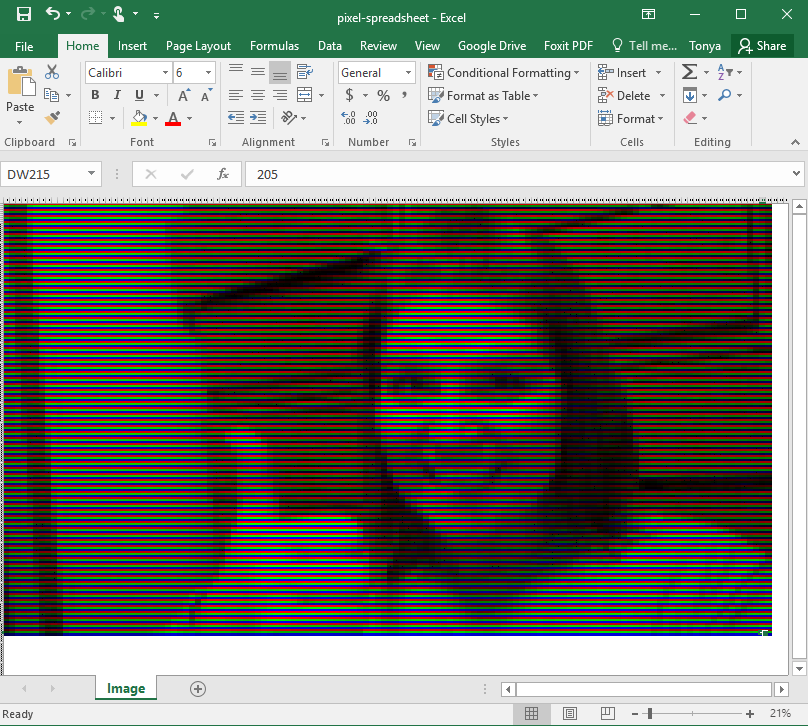
In his YouTube description, he has a neat little application where you can upload an image and it will convert your photo into a spreadsheet. Here's mine: (goes all the way over to column DW!)


Yes, he turns the word SELFIE into EXCEL-FIE. :) Enjoy!

Monday, April 17, 2017

Google Chrome font issue... #busedu #gafe

So, numerous students this year have had a strange issue where their font on Google search results, Google forums, and other pages are light and italic. It does not follow the user to other computers, and I have been plagued all semester with students randomly having this issue.

Today, I finally decided I was going to tackle the problem head on (I'm on break and surgery tomorrow so I'm about to have a few weeks off)! I have Googled my heart out before, but I was bound and determined to get to the bottom of it.

My workflow--

1--Google. And read Google forums. Several had this issue and some recommended Chrome extensions or uninstalling Helvetica fonts. I didn't love that idea. Next.

2--I had a thought (the web design teacher in me) that maybe I should try "inspect element" on that italics font and see if I could find WHAT FONT was the issue. In that process, I isolated Roboto to be the offender. On two machines I tested that I  knew students had issues (one was light and italic and one was actually bold) I found that they each had one version of Roboto font (for one, italic and light and for the other, the dark "black" version of the font). Hmm. On a whim, I looked at a computer that worked fine... it didn't have Roboto font installed at all.

3--On the "light font" computer, I installed Roboto font and tried to figure out which (it had tons of variations) specific font it needed to display properly. Apparently it just uses "the only" Roboto font (and why Google chose that, I do not know... it doesn't roll down the font stack and sub with Helvetica or Arial or generic sans-serif. Instead, it just uses any old Roboto) that is on the machine. So, I downloaded and installed Roboto-Medium (you can grab it here).

That worked! Yay! Celebration!

I actually left off that I tried Roboto-Regular and Roboto-Medium and then cleared the cache (Control+Shift+Delete in Chrome and only check "cached images and files" and apply). That worked, too, but I don't think you actually need both or need to clear the cache if you get the "right Roboto" in the mix.

NOTE: My students do have rights to install font since we do graphics in my class, so probably if you are locked down, you won't have this issue... but you never know!

Anyway, I feel accomplished today. And, maybe someone else has had this same issue, so hope it helps you!

Wednesday, April 12, 2017

Social Media and business... throwing shade! And my rant... #busedu

Taking a minute to peruse the Twitter-verse this afternoon whilst resting between NBEA sessions and found this gem from HootSuite in March 2017--

10 Risky Brand Comebacks on Social Media That Worked

Of course, had that been written this week, it would likely feature a Southwest brand attack on United Airlines for the "dragging incident" earlier this week (but Southwest didn't really tweet that... read this). And this website includes the best social media fun from that incident--

Hilarious Twitter Reactions on the United Airlines Fiasco

But to be serious for a moment, all of this seems to be very telling of our times, right? As a business teacher, I was raised (by Dr. Linda Henson Wiggs at Southeast Missouri State University) to be a professional. The business teachers should be the "best dressed" in the school (man, glad I don't have to wear pantyhose anymore!). And, we taught the right way to respond to negative feedback, how to write a proper rejection letter for a job offer, and how to politely deliver bad news.

But, in 2017? Wow, the world is a different place!

Social media has changed the climate for business and education. The concept of business transparency is critical to business success. Now, businesses cannot run from complaints--they are all over social media, not just in an angry letter solvable by a free taco coupon (can they ever get an order right?).  And, as a teacher of business or business communication, how do you equip students to face this changing business climate?

It's a constant battle and something we, as teachers, cannot run from. If you are teaching business and are not keeping up with social media, you just HAVE TO. It's time. You cannot relate to today's student (and business!) if you are not in touch with the pervasive nature of social media and how it impacts not just individuals, but the world of business.

Maybe I'm just a big ol' mess, but I'm getting tired of people talking about how they don't have time to learn another thing, don't want the drama of social media, yada yada. Whatever you want to say, my social media knowledge (and my insights from my kids and my students about what they are into, such as Snapchat) are invaluable. Every business teacher needs to get on board. You don't have to be tweeting regularly or creating blog posts every month. But, exploring social media and reading about its importance is critical. It's not something you can run from. Your students deserve your commitment to this if you are going to be the business or technology expert that you should be in the classroom.

Of course, you're probably not reading my blog. :)

Monday, March 27, 2017

Too much interesting business stuff in the news! #techteacherblues #busedu

As a predominantly "tech" teacher, I get few really relevant opportunities to work in business "real world" news for my classes. I try when I can, but it's a challenge.

Current topics, yes. For example, we spent a week using giraffe pictures after I learned of the expectant giraffe at Animal Adventures in New York. My Photoshop kids selected images of giraffes all week, expecting to be able to witness a magical giraffe birth (complete with cupcakes to celebrate if it happened during their class hour!) but alas, it's over 3 weeks later and I'm still waiting on that silly giraffe (and they still ask daily about it... a group told me they just watch the giraffe at home when they are bored).

But, that's not super "non-fiction" useful or anything, right?

Last week, I was excited to learn about the Cracker Barrel "Brad's Wife" fiasco. Did you hear about this? Oh, man. If not, you HAVE to take a gander... but great opportunity to discuss at-will employment and social media to complain!


And today, well, two interesting talking points relating to customer service:

Really interesting topics! Good marketing, business, customer service, social media topics. Not so much for Web Design or Photoshop, though. Or, Microsoft Office.

Sometimes I really miss my traditional business classes.*sigh*

So, for the rest of you, be sure to get those kiddos talking with the interesting things happening in the news. It gives them a reason to read nonfiction and... well, I'm jealous.  Meanwhile, crossing my fingers my Applied Business Communications class makes next fall!

Have a great day!

Thursday, February 9, 2017

FBLA Adviser Appreciation! :) #fblaweek


It's National FBLA Week! 


And I've kind of had a rough week. I've had some health issues and missed school yesterday for a doctor's appointment (on Adviser Appreciation day of all days I learn I'm going to have to have a hysterectomy!) and just haven't felt perfectly lately but I came to work today and one of my Advisory students who is also an FBLA officer brought me my Adviser Appreciation poster he made! He knows I am a HUGE Wonka fan and he made this amazing poster with phrases from the movie and even a golden ticket. It was incredibly thoughtful and truly made my entire day. Sometimes, it just takes little things to make us feel better, doesn't it? 


Thursday, January 5, 2017

Google Drive and Microsoft Office Stuff #busedu #office

So, over break, I finally got into my OneDrive (formerly SkyDrive) from Microsoft to edit a document. And, I couldn't save it! Apparently I was (oops) 25 GB over my allowed storage space. I guess that means at some point they changed the allowed amount and I just never realized. Either way, I couldn't work on the document in the cloud and had to download it and then upload it to my Google Drive. It was a test and for whatever reason, those image and numbered/lettered lists never convert well to a Google Doc when I try. **SIGH**

But, I found someone who shared info about a Google Drive plug-in that adds a ribbon in Office AND allows you to open straight from Google Drive (in Word!) and edit the DOCX file and save it right back to Google Drive, exactly like my OneDrive did. Yay! https://tools.google.com/dlpage/driveforoffice

It worked great on my laptop. Then, I returned to school.

Fail.

Not sure why. I tried it on two computers but I got an "exception" error for the Google Drive plugin. And, I can't use it at all at school. Probably a firewall restriction. I have no idea. But, I still needed to finish that test! And I was determined not to download it OR convert it to Google Drive Docs either.

So, I tried the whole "Open With" thing on my Google Drive to investigate options and ran into something called OnlyOffice. I was pretty impressed, too.

Features

ONLYOFFICE allows you to edit Office documents in browser.

  • Compatible with .docx, .xlsx, .pptx formats.
  • Works right in your Google Drive account.
  • Connects to Dropbox, Box, OneDrive and Google Drive.
  • Provides co-editing and commenting. 
Anyway, here's a snapshot:

Let me be clear about a few things. First, I like Google Docs and it's come a long way. And if I am starting from scratch, sometimes that works perfectly fine. But, I still use MS Office and not having cloud storage for it is the PITS. So, this is a great alternative for something I've already authored in Word to be able to finish and not have to convert.

Just thought I'd share. Check it out!  Have a super day!