Pages

Showing posts with label gafe. Show all posts

Monday, July 17, 2017

Conditional Formatting Fun with Google Sheets! #gafe

Back in the day, I was a typing teacher. Around holidays we would sometimes do the "Typing Mysteries" where you had to spacebar so many times and then type certain letters to create "art" (ASCII art, they call it now).

In preparing for my Google Sheets session later this week, I decided to come up with a fun way to reinforce two spreadsheet concepts-- cell references and conditional formatting. This, a pixel art constructed from conditional formatting was born!

I think students (especially middle level) would love doing this for each other. They'd need to create a legend/key for their colors (and since I wasn't sure what I was making, I have colors I don't need so if they plan further ahead, they won't need extras) and set conditional formatting for the entire spreadsheet (range 1:1000) to have that condition with that text AND fill color. In the example at right, notice I have a pale green text and fill color when the cells are equal to 10. You do this so the numbers won't show up.

Then, create the artwork! Instead of using a fill bucket and trying to click over and over, you simply type in the number for your color. I find it easiest to make the key in the first column next to the row number to keep it straight when trying to create-->


You will also need to resize the columns so they are squares, like pixels. Press the button at the intersection of the rows and columns to select all, and then drag one cell and it will resize them all. Like this:
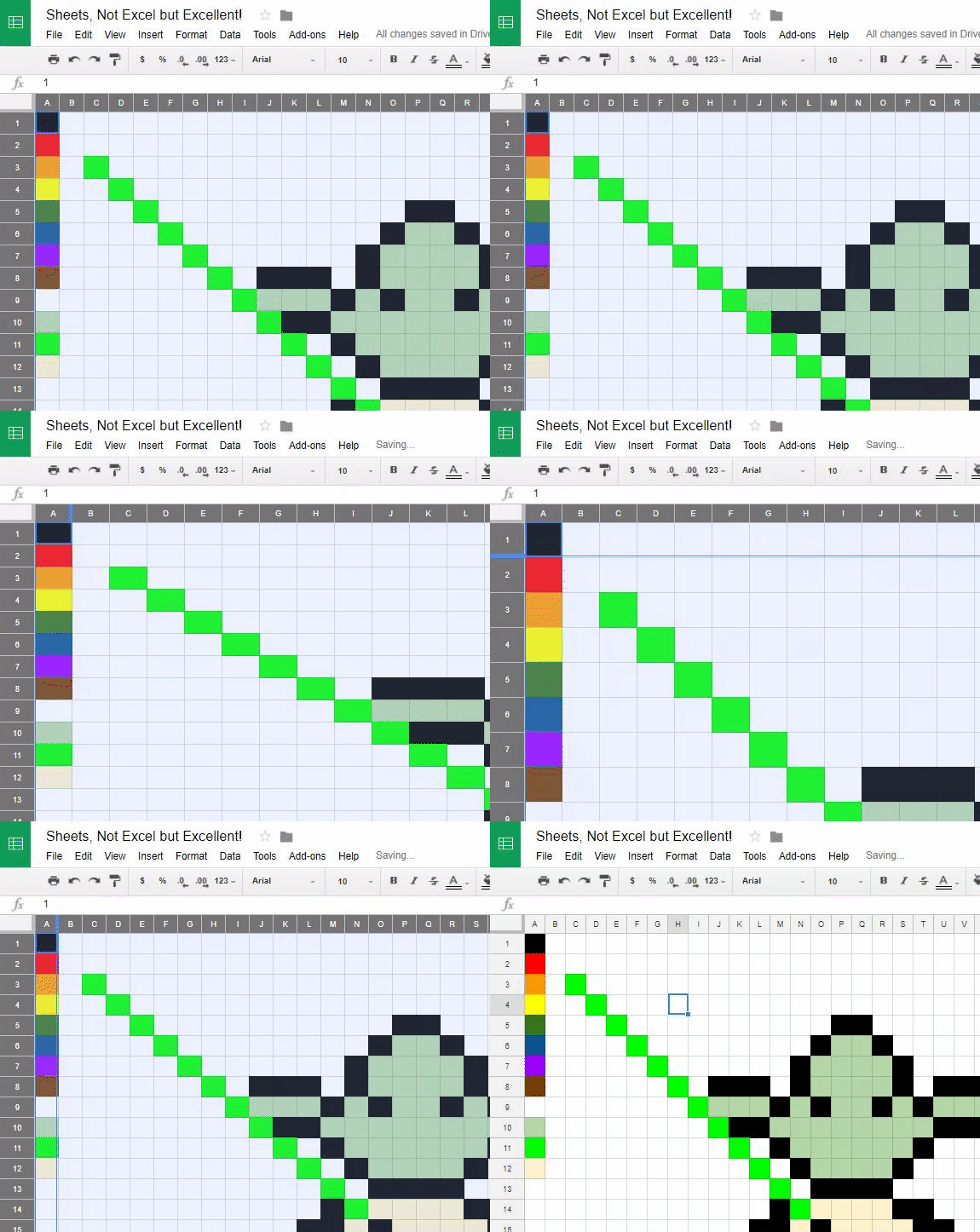

The "mystery" page for this sheet is here! You could do this with Excel as well, but I used Google Sheets. I think it would work best in a classroom if they created their own, wrote/typed the instructions, and then switched and read it aloud to a classmate. It's easier to do if someone reads the input to you (and makes them talk to each other!). 


Monday, April 17, 2017

Google Chrome font issue... #busedu #gafe

So, numerous students this year have had a strange issue where their font on Google search results, Google forums, and other pages are light and italic. It does not follow the user to other computers, and I have been plagued all semester with students randomly having this issue.

Today, I finally decided I was going to tackle the problem head on (I'm on break and surgery tomorrow so I'm about to have a few weeks off)! I have Googled my heart out before, but I was bound and determined to get to the bottom of it.

My workflow--

1--Google. And read Google forums. Several had this issue and some recommended Chrome extensions or uninstalling Helvetica fonts. I didn't love that idea. Next.

2--I had a thought (the web design teacher in me) that maybe I should try "inspect element" on that italics font and see if I could find WHAT FONT was the issue. In that process, I isolated Roboto to be the offender. On two machines I tested that I  knew students had issues (one was light and italic and one was actually bold) I found that they each had one version of Roboto font (for one, italic and light and for the other, the dark "black" version of the font). Hmm. On a whim, I looked at a computer that worked fine... it didn't have Roboto font installed at all.

3--On the "light font" computer, I installed Roboto font and tried to figure out which (it had tons of variations) specific font it needed to display properly. Apparently it just uses "the only" Roboto font (and why Google chose that, I do not know... it doesn't roll down the font stack and sub with Helvetica or Arial or generic sans-serif. Instead, it just uses any old Roboto) that is on the machine. So, I downloaded and installed Roboto-Medium (you can grab it here).

That worked! Yay! Celebration!

I actually left off that I tried Roboto-Regular and Roboto-Medium and then cleared the cache (Control+Shift+Delete in Chrome and only check "cached images and files" and apply). That worked, too, but I don't think you actually need both or need to clear the cache if you get the "right Roboto" in the mix.

NOTE: My students do have rights to install font since we do graphics in my class, so probably if you are locked down, you won't have this issue... but you never know!

Anyway, I feel accomplished today. And, maybe someone else has had this same issue, so hope it helps you!