Pages

Monday, June 28, 2021

Icebreaker... Three P's

 I don't know about you, but first days of school are long and often boring. Though I do try to avoid spending most of the time on procedures or rules, I also realize (as an introvert) that asking me to stand up and talk about my summer is ABSOLUTELY not something I want to do. I don't care to hear that you went to Europe or hiked to the top of Pike's Peak. I watched Netflix, so thanks. :)

So, with that in mind, I often try to do icebreaker activities in smaller groups and in a way that isn't going to upset my introverts too much. 

Here's one that I think might work well from Tophat.com that I created a document to go with--

Divide students into small groups, and have them share three facts about themselves: something personal, something professional and something peculiar, such as an interesting hobby or habit. 

A few little pieces of advice:

  • Always ask students to say their own names on day 1 (so you don't butcher them AND so they have a better opportunity to let you know what they go by-- so you aren't calling someone Alexandria when she prefers Lex!) and have a seating chart so they know where to sit (this prevents shy kids from feeling like they have no friends and avoids cliques from sitting in groups). I usually just say, "Okay, let's see if you found the right seats..."
  • If you do a sharing activity, divide them into small groups and let them share in a little group rather than a big class forum. Then, you can collect the papers and review them on your own (I think it's nice to collect them after giving a little "work and small share time" and then ask if they want to share something they learned from someone else and you can make notes on the papers while they do. 


Here's my "worksheet" for the activity. Feel free to make a copy of your own!

Wednesday, June 9, 2021

Icebreaker fun! The NUMBERS game!

 It's early summer but I am already on the hunt for ideas for back to school (it's a given when you have 6 preps in one semester and you refuse to repeat activities since some kids may take you multiple classes per day!). 

I ran across this fun idea today, the Numbers game! Here's the YouTube video and then my suggestions.


I love the idea of getting students UP and MOVING. I think week 1, this is important. This is also a great activity for getting them to have to work with others (without them even realizing it because it all moves so quickly). 

So, the guy in the video just has them doing arbitrary numbers, but as a business teacher, I thought... come on, how can we make this a little more "interesting" and so here is my take!

  • I may not have 20 or 30 (or exactly that number, rather) kids in a class... so I think setting this up with maybe smaller group numbers would be easier. You might have to have a person in the group who does not have a number and helps put them in order OR you could have a number that repeats (like zero) and have multiple of that one.
  • Price is Right style-->
    • Go on Amazon or get out the local grocery store ad and use prices of items
    • If someone is correct, they win... or you can give them so much time and then pick who is closest to award points OR you could say that this team is closest and the answer is higher or lower or whatever
  • "When Did It Happen" style-->
    • I found this webpage from Information Age with key events in the story of technology and this one from LiveScience with Internet History. You could use dates for all answers (4 digit years)... granted, many of these will have a 1, 9, or a 2 in them... but it would be a race to guess correctly AND you can relate it to tech!
    • Examples:
      • 1832: Charles Babbage invents the first Computer.
      • 1904: John Ambrose Fleming invents the vacuum tube.
      • 1936: Alan Turing proposes what has become known as the Turing Machine.
      • 1976: Queen Elizabeth II hits the “send button” on her first email.
      • 1981: IBM invents the PC.
      • 1983: The Domain Name System (DNS) establishes the familiar .edu, .gov, .com, .mil, .org, .net, and .int system for naming websites.
      • 1991: CERN introduces the World Wide Web to the public.
      • 1995: The first online dating site, Match.com, launches.
      • 1997: Netflix is founded by Reed Hastings and Marc Randolph as a company that sends users DVDs by mail.
      • 1998: The Google search engine is born, changing the way users engage with the Internet.
      • 2003: The blog publishing platform WordPress is launched.
      • 2005: YouTube.com launches. The social news site Reddit is also founded. 
      • 2007: Apple releases the iPhone.
  • Get to Know Mr/Mrs style-->
    • Honestly, I'd embed this in the other games, but you could have a few just fun facts about you to help them get to know you... like the year you got married, graduated high school, turned 40, got your first car... 
What do you think? I am excited to try this one out in the fall. Heck, this might even be fun in an adult leadership retreat or conference!


Sunday, April 19, 2020

9 Objects of My Isolation

We've been out of school since March 13 and most instruction is being delivered online at this point. As a teacher, I don't like it. For Elementary, maybe it's fun. I mean, you have 25-30 kids in your class and you are "their classroom teacher" so they spend almost all day with you (and have been since August). In high school, I have 130 students a day, so mine are with me for 50 minutes and have 7 other teachers to see daily. That's 8 sets of classroom rules/expectations and 8 different personalities (some who they click with and some who they do not!).

So, as part of my "alone time" I prepared (in honor of the instagram challenge), 9 Objects of My Isolation (using PhotoPea on a Chromebook, since I am asking my Photoshop kids to do one as well).


And, here's my explanation...


  1. Top Left:  Puzzle! We worked on a 1000 piece puzzle at some point after the first week. Everyone in the family worked on it together from time to time. I ordered other puzzles, but after two weeks off, no one really cared to do them anymore. :(
  2. Top Middle:  Zoom! I don't know if my students are getting tons of Zoom calls, but we do a faculty zoom at least once a week, department meetings by Zoom, FBLA officer meetings (and virtual interviews) with Zoom.. and I'm finally trying it with a class next week and hoping at least a few show up.
  3. Top Right: Kitties! That's Pumpkin and Ollie. I have a feeling they wish we were all at work/school because they are probably tired of having people around constantly.
  4. Middle Left: Wii! We pulled out the Wii again. We've mostly played Smarty Pants and Wheel of Fortune. I wish I had a working Balance Board, but it died in a flooded basement sometime in the last few years.
  5. Middle:  My Girls! Though my kids are tired of being at home, it's been nice to see them every day and spend time together that we wouldn't typically get to spend, especially my senior daughter who moved into the dorms in August for college.
  6. Middle Right: Meat! Okay, I just thought it was funny that after a week out, meat was hard to find. This was a pic from a day where I was excited to find two kinds of meat at one store!
  7. Bottom Left: Road Trips! I mean, when you can't visit many places, you get in the car and drive. We've done a little roaming around.
  8. Bottom Middle: Netflix! My oldest daughter and I watched all seasons of Kim's Convenience, a sitcom. Now I'm watching Scandal (crazy!).
  9. Bottom Right: Scrabble! We've been playing board games quite a bit. Scrabble, Pictionary, and Telestrations, to name a few!
Hope your COVID break has provided you time to relax, learn, and spend some time with your family. But, I am sure missing my students!

Friday, March 27, 2020

No Illustrator? Try YouIDraw! (free)

Here's a 15 minute review/demo of a browser-based vector graphics editor/creator. The free version is limited, but when it comes to something similar to Adobe Illustrator that can be done on a Chromebook, this is about as close as I have found.

Tools you will see:

  • Typical Move, Rotate, Skew
  • Shape tools
  • Type tool
  • Hand tool

Panels/Features you will see:

  • Layers panel
  • Pathfinder (similar) panel at top of the screen
  • Library (gradients are here, and it actually has objects and lots of shapes)
  • Properties panel (where you can change fonts, modify fill/stroke, transparency and appearance panel type things, flip horizontal/vertical, and the canvas size/background color)
  • Export button-- be sure to tell it to export OBJECTS and not entire Canvas if you want transparency
They have a pretty simple user guide, too-- https://site.youidraw.com/youidraw-drawing-user-guide.html

What's really missing-- (among other things)
  • No knife tool
  • No trace bitmap (you can insert images, though, and if they are SVG images, you can edit the paths, change colors, etc.)
  • No good control over angles
  • No Shapebuilder or other fancy tools
  • Text path tools
  • Ability (in free version) to export in anything other than PNG (transparent) and JPG

What it does that Illustrator DOES NOT do-- save to Google Drive!

Tuesday, November 12, 2019

Fantasy Photoshop Fun! What the Animal Project!

Some years, we do a compositing  project, which is a great review of using Selection tools, Layer Masks, and Adjustment Layers called the What the Animal project. Students must take numerous parts (four) of animals/insects and create a new one with some color adjustments.

Here's a video demo of me walking through this example one (you can download the PSD in the video comments on YouTube).

A few tips:  1) Make sure students sketch out an idea before they start as they collect the parts. It makes it easier to grade and helps them think about getting pics that are turned the correct direction, etc., to match.  2) Make them turn in a thumbnail sheet so you can see the images they started with (sorry, they will cheat and just find one already done online).   3) Make your own! They want to see what you come up with, too!


Friday, November 1, 2019

Teaching Web Design... read on!

First off, my apologies for not being as present this school year. It's been a trying semester for me, for some reason. But, I wanted to give some updates for those who teach Web Design.

I revamped my curriculum and I'm still ironing out the details of how I want to do things, but I did create a TON of resources this summer to go with my materials. We also shifted to using Repl, a coding site, where students code in-browser. I can have them turn in projects through that, do bellringers, etc. It's working really well for us.

Here's a walkthrough video. I wanted to show you what it looks like and how to use with the kids. I will say that it always starts with a skeleton HTML file (with an embedded script that we delete), a script. js file (which we delete), and a blank css page. When I begin the class, I made the kids delete everything but the index file and then even all the content of the index file before we type everything in. At this point, they use the skeleton file and just make edits. But, you can drag and drop in other html files (if you drag in an index.html file, you will have to tell it to REPLACE the current one) and you can drag in image files from the computer as well.

I deliver materials (mostly just the links) in Canvas. I don't run it through modules or anything (yet, maybe eventually). But, here is a link to my bellringers file (which I add to as my kids need more practice). We do some of these whole class together to practice from the unit or they get 20 minutes to try to work on it and then we do it together. I don't grade any of them (I hand out stickers sometimes, though). We do a ton of practice, including self-graded practice quizzes I made on Google Forms. 

Links:
  1. Coding the Web Textbook (Links to an external site.) (work in progress)
  2.  Bellringers and Class Activities Packet

Self-Grading Google Practice Quizzes (Coding the Web)--

I did do a hand-coding quiz the other day... they were relying too much on guessing on codes and not looking it up (they are allowed a notes page for quizzes AND for work... and some weren't even getting them out!). We practiced hand coding every day for a week because it was driving me nuts. But, they are doing much better now.

Anyway, this is a rambling post today... but I wanted you to know 1) we all struggle, 2) you are not alone, and 3) here's a resource that might help you.  Oh, and if you managed to get this far... here are my "teacher recap" videos for my chapters, in case you need any help figuring out how to use some of the code.

Have a great weekend!

Tuesday, October 1, 2019

Barely Keeping My Head Above Water! Parent Conference Week!

Can I vent a minute? This has probably been the most stressful school year of my teaching career! My many preps, my daughter being a senior in high school, and trying to remember to write objectives every day every hour are testing my limits. I was in bed before 8 PM last night.

But, it's Parent/Teacher Conference week here at JHS. These early conferences are always a challenge. I have 120 students to remember and unless you are not turning in work, being a discipline problem, or you've struck me as wonderfully genius or polite, I may not really know your work habits (or name... ahem).

So, I like to ask my students to complete a conference form ahead of time. We take about 10 minutes of class time and students have to check their grade, note missing work in my class, respond to questions about their satisfaction with their grades and the course, and then I use this information when I conference with parents. It's much better than that standard... "Oh, who do you belong to? Jared... okay, he's in my second hour. Let me check his grade. 96, A. He's doing pretty well. No concerns. Good kid."

This also gives me feedback while I sit there for 7 hours. I can reflect on how I'm doing and how they like the course so far, so it's good for all of us, right? And parents always say that they like it, so it's good to keep those mommas happy! Occasionally, I change the questions up a bit.

Here's a link to my form (Google Doc). Feel free to File> Make a Copy and edit as your own. Good luck with upcoming conferences!

Friday, August 2, 2019

Jeans day? Casual dress? What do you think?

I bought a romper last week on Amazon. I don't really own "adult onesies" but I wanted to try to be trendy. So, I got one with a reasonable length and paired it with a little black vest thing. It is that "on trend" pattern so I'm cool, right?

Wrong. My 17-year old told me I looked like I was wearing PJs and my 13-year old just laughed at me.

Don't worry, I'm at school wearing it anyway. It's comfy!

So, as I am heading back to school (had ALICE intruder training yesterday) and everyone is still enjoying wearing their yoga pants and shorts to school, I reminded myself of my business teacher training days (bear in mind, I graduated college in 1997). Dr. Linda Wiggs, my business education adviser, told me that you could always find the business teacher in a school. She was always the most professionally dressed person! At that time, it was true. Typing teachers were known for wearing suits and heels (gosh, remember that? and pantyhose?!).

However, when I started my very first year teaching, I did show up that first day dressed to the nines. I was approached by my mentor teacher immediately, telling me that I shouldn't "show up" the other teachers by dressing up so much. I was personally offended. I mean, I'm the business teacher. The kids need to take me seriously, right?

And jeans days? I didn't wear them. I thought it was unprofessional. Honestly, I was kinda fat and they were uncomfortable anyway.

But, I do feel differently now. I still believe you need to dress up the first few days (or maybe even weeks) of school. Casual Friday, though, it's up to you. I wasn't always wearing jeans (moreso because I just didn't have a good comfy pair) but there was something that students liked about seeing you in a school spirit t-shirt on football Friday. And, on spirit days, I now go all out and participate when I can (you should have seen me on Jersey Shore day about 10 years ago!). I might not wear jeans on Fridays all the time, but I typically do wear a school spirit shirt so I'm not the one teacher who is in fancy dress on Friday.

So, going back to school, just remember that you always need to look professional and approachable. And, you need to support students when given that opportunity--wear your school football shirt (don't have one? Shame on you!) or FBLA t-shirt. It's such a simple token.

Don't overthink it. But, be sure you are always seen as in charge of the room. I'm short, so often heels are necessary or people can't even find me when they walk into my room. If you need to dress up to feel more in power, do it.  But don't feel like you can't dress down when given permission.

But, don't wear pajamas.

Wednesday, July 31, 2019

Easy Google Form Breakout and Some Tools!

I've created "digital breakouts" for a few years now. Some are super complicated and take nearly an hour to complete (and sometimes few students even complete them) and I love the idea of them, but it's just so time consuming. Even the cool "breakout boxes" are just sometimes too much work having to program locks, set up the room, etc.

So, here is my "easy Google Form" breakout method. I created this as a Business Law bellringer activity for this year.  Between the tools I used and the setup, I thought this might be helpful, or if you actually teach Business Law, feel free to use it in your class.


I didn't create this list, but someone shared this resource with lots of tools for using in breakouts (like the Jigsaw Puzzle). Check it out!

My Breakout

My Presentation Mentioned

Tuesday, July 30, 2019

Google School? Advisory? Read on....

We have Advisory where we get kiddos when they start high school and have them daily until they graduate. When I had a new group coming in last year, I sent them all an email before school started to give them a heads-up (also emailed parents) about my room, where it was, and my profile. Then, they started on their profile. Some did it in advance, others did not, but I gave them time during the first week to add to it as they wanted. Then, I had them update it at Christmas and again at the end of the school year.

I really like having all of this info!

Anyway, watch my video and learn about it...


And here's a copy for you! Feel free to modify as you see fit (click File> Make a Copy).

Saturday, July 20, 2019

Making a FUN Syllabus... sorta. :)

I've used numerous online tools to create my course syllabi over the years. Back in the day, we had to print them and send them home (I think we even had to get them signed!) but nowadays, a visual syllabus posted to a course website generally will suffice. But, they sure can be boring!

Over time, I have decided a syllabus should be an overview of the course, not a list of do's and don'ts (some of my college syllabi were 5 pages long!). I don't think it's a place for all the rules or a restatement of school policies. I think it should include some degree of expectations, what is needed for success in the course, and what the learning outcomes are. But, some schools may require specific information that you have to include.

In the past, I used Piktochart, and it's great. But, you are limited to 5 documents (so... I might have two accounts, one with my personal email and one with my school one).

This year, I picked up a new course (Business Law) so I decided to create a syllabus in Google Slides. You can check it out below or view it here (and feel free to File> Make a Copy and edit if you want to use it as a template for your own). I started by downloading a template from Showeet because they had some nice "techy" artwork.


I did use Piktochart to create an About Me page to post in the room and on my Canvas page for the students to learn more about me (I love their infographic options and clipart icon gallery that is built-in). I think it's important to give students some background information so they can better relate to me when school starts. Here it is (their site provides an embed code and I embed it on my class page like this, too):


I hope this is helpful!

Wednesday, July 17, 2019

Going Fishing at School... icebreaker!

I'm knee deep in curriculum development today and ran across a "fun" little "go fish" activity from We Are Teachers. Go check it out there! You can even download a template and create your own. Here's mine:  (PDF)

I'm gonna go pick up some tree limbs (maybe.. or maybe I'll buy some sticks...lol), grab some string, get some magnets and let the kids get in groups and fish for questions. Students struggle making conversations, so my rule will be that you:


  1. Get in groups of 5 (I think that's a good size).
  2. Dump the fish in the sea (I had to decide whether I want to put them in something so it's more random or let them see the colors so they can somewhat pick the fish... decided on the latter so my shy people would feel some element of control over the questions). 
  3. Take turns fishing. After you fish, you read the question out loud and answer it. Then, at least two people in the group (you could make rules about who... like the person to the left and the right of you, for example) have to ask a follow-up question and you have to respond. 
Looking forward to seeing how this goes over and hoping no one gets "seasick."  :) he he

Tuesday, July 2, 2019

Why I Work All Summer....

So many people "get on me" about going to school in the summer. First, let me be clear. I don't get up at the crack of dawn to get to work in the summer. I sleep in, roll in to work around 9:30 or 10 AM and stay only a few hours and not every day. But, the building is generally empty with few teachers around when I am here during the summer break.

So, why?

First, I am a technology teacher and keeping up with technology is not something I can "do well" by just managing during the school year. Sure, I can try to catch a random YouTube video or follow the Adobe Twitter feed during the school year and learn about a new feature, but I cannot dive in and really immerse myself in the software during the school year when I am busy trying to teach my "five prep" schedule. It's just not possible. So, summer it is. I must update myself on my technology skills, learn the new things that are happening in the Adobe and Microsoft worlds, and get comfortable with it so I can teach it when school resumes.

Second, curriculum doesn't update itself.  I'm not dissing my Social Studies and Math friends; I know you also do a ton of prep outside of contract time. But, history and math are pretty static. Business and technology are always changing and it's a disservice to my students to just continue to teach content that's a few years old. I have to update articles to match what's happening now. My projects and curriculum must reflect current industry standards and expectations. And, if I don't do it, no one will... unless I can somehow find some little curriculum elves around here (no luck so far).

Third, backwards design requires me to evaluate and update assessments OUTSIDE of school time. I give a pre-test and post-test in each of my classes. Over summer, I review the data to see what questions were low scoring. Then, I either update the assessment to better reflect what I taught OR I update my lesson on that content to better prepare students. I find it is MY FAULT if they cannot score well on my assessments and I have to be responsible to find the solution. I use Zipgrade to review item analysis and consider low scoring questions... clearly, I need to focus more on the "Principles of Design" unit on Web Design for next year:


Finally, being a teacher is part of who I am. I love to teach. I aim to do it well. Though I often feel my efforts are unnoticed or unappreciated, I don't do it for recognition, better pay, or a pat on the back. Whether my students or administration appreciate it or not, I know if I am making my best effort. Anything worth doing is worth doing well.

So, don't feel sorry for me for working during the summer. It's part of who I am. I am devoted to being the best teacher I can be and I don't apologize for it. But, don't worry. I make time for ME and my kiddos, too. I already watched the entire new season of the Flash and am a few seasons in on Heartland right now, I've seen the new Men in Black, Child's Play, and Toy Story, and I've attended a few conferences. All work and no play makes anyone crazy, right?  :)  I hope your summer is moving along beautifully!

Wednesday, June 12, 2019

It's not the first day yet! But, planning for a good year!

Like most of you, I am on summer break. In between revising curriculum, conducting teacher training, planning for conferences I present at later this summer, and RELAXING, I am still searching for ideas for next school year. I always want to improve from year to year!

I was thinking today about how important starting off on the right foot is for students. My daughter is a good student, but she takes it very personally if she has a bad "teacher encounter" early on in a class. We had one such example her sophomore year (and, truly, that teacher did not treat her properly, so her reasons were valid). A teacher did not like the fact that she wasn't thrilled about his science class and put her on the spot about it (oh, let me mention, she made an A in the class). He damaged that relationship to the point of no return within the first two months of school saying that if she didn't "act like she liked this class more" then he "won't help her in the future."

WOW.

I try very much to avoid judging students. But, I think it's important for students to judge themselves. They know themselves way better than we do. So, in looking for resources, I found this self-evaluation and goal-setting sheet from MathGiraffe.com (go to their site to download!).


I love the idea of asking students to self-evaluate before they even begin your class. How did they feel about last year? What were they proud of? What do they need to improve on? And, what are their goals for MY CLASS?

Do you ask students to set goals? I often put on a student information form something like "target grade" for my class. I typically put: 

  • Straight A (no minus!)
  • A range
  • B range or higher
  • C range
  • I just want to pass!
You'd be surprised what students are not "okay" with just something in the A range. They do not want that A- and are discouraged by it. Others are going into your class just expecting to get a C. They don't even aspire to higher than that. And, others simply want to not fail. Some put what THEY want and others put what MOM AND DAD expect. 

KNOWING THIS INFORMATION IS GOLD.

You can connect with your students to help them reach their goals and, for some of them, help them realize that they can set higher goals. I encourage you in the fall to take a little time out and have your students set a goal for your class. Perhaps that goal is related to effort, communicating, remembering to log in before the bell rings, not being late, checking grades daily, being open to helping others... sometimes they have to start small. But, come back to this goal and call them to task. If a student puts that they want to "become better at answering essay questions" and they leave a question blank on a test or they write one sentence as a response, you should bring them up to the desk and have a conversation about how this effort is not helping them meet the goal. Instead of griping them out for leaving a question blank, writing in an angry face with your -5 points, or just writing "poor effort," having that conversation related to their goals that THEY set, can help show more of a relationship and concern and less of a judgment.

Good luck!

Friday, May 31, 2019

Illustrator and Photoshop Mock-ups! Smart!

I've participated and viewed Logo Design Contests online for years (mostly to get project ideas). Some of the entries are so fancy, with billboard and glass windows with the logos on them. I always wondered how they took the time to do that for these contests. And, I know the concept of mock-ups....

But, friends, I didn't know you could just download tons of free mock-ups that you could place your artwork into!

My kids are going to love this in the fall!

Have you ever had your kids design artwork for can? A box? A bottle? It's "fine" when you look at it on the computer, I guess, but using a mock-up will get them much more excited and bring their ideas to life.

Here are a few sites that you can get them from:

Just watch my short video here and you can see how to use them. I'll be using this in a workshop I'm doing next week on Illustrator!

Here's my example with my family cycling logo, put nicely on a cup (and I show you how in the video!):


Curriculum Work... Tylenol Murders!

Well, school has been out for less than a week and, while also prepping for a workshop I am giving next week, I am already working on curriculum for next year. I am picking up Business Law (yay!) next year and wanted to try to find a few podcast episodes to work in to the class.

I was listening on my way to work yesterday on the How Stuff Works podcast and they had an episode on the Tylenol murders. I had been reading about the biggest recalls of all time for the unit on product liability and that sort of thing and thought this was timely. So, here's the episode I listened to:

https://www.iheart.com/podcast/105-stuff-you-should-know-26940277/episode/the-tylenol-murders-part-ii-45475709/

I think the students will enjoy it. It's pretty long, so might do a few time cues and have them skip some things so it can fit into one class period and leave time for discussion (this is part 2, I didn't listen to part 1).

My thought is to play it and have a visual "notes sheet" they will work on while they listen to help them listen (more of a scavenger hunt to figure out why the words/dates/etc. are important).


I honestly think this would work in a variety of business classes since it really discusses the public
relations needed to come back from a crisis like this one.

Anyone have any other good podcast episodes kids might enjoy?

Wednesday, May 22, 2019

Old School Typing Tournament! #busedu

This week in my Computer Applications class, we've had some fun. Last week, I had students take about half the hour to do some typing practice (Typing Academy 2 minute timings). I walked around while students were typing just checking out their typing speeds (which, by the way, my students were pretty impressive! I had 12 out of my 25 who were typing around 50 wpm or more!). If they got a speed they wanted me to see (improved), they could call me over and I recorded it old school on a clipboard.

I had decided to probably take the top 10 or so and create a bracket, but due to time, I just went with top 8. I found an online "bracket" through Challonge and plugged in the names based on their ranks on my walkarounds and put it on my class website and Twitter, so they could all see who was ranked where. They were quite eager for me to update it each day!


The competition rounds were fierce! They had to type at my teacher computer at the front of the room on the big screen (yep, where everyone could watch). PRESSURE. And it really affected speeds. They were feeling it! I always had the  lower seed go first and they got TWO attempts, just to take a little pressure off. Round 1 we did over two class periods and then the other rounds on two different days. Students were also working on their independent review (Mindtap SAM reviews for our final exam, which got boring sometimes, so this was a distraction at times for those who wanted a break!).

I used this website and created a "custom text" timing (sign up with a Google account for free and you can create and save your own) that they typed (this example is round 3, which I actually gave my top two the night before so they could practice on their own), but I started with different text for the other rounds and they didn't get to practice it in advance)-->
         Final Round  https://www.keyhero.com/custom-typing-test/tournament-3/

To determine their actual "score" I took the words per minute times the accuracy rate. If you look at my bracket, it was pretty close a few times and accuracy mattered!

If I were to do it again, I might do two brackets (silver and gold, tiered so slower ones have a chance to win) or a double elimination. I probably should have done a third place match, too. But, this was my first attempt. In my Computer Apps class, students do Typing Club as a side thing and in class several days during the semester, so we are always encouraging them to improve typing speed and accuracy; this was just a fun way to end the course, and it was a bit fun listening to the students root for the underdogs!


Thursday, April 11, 2019

Seesaw Amazing Race? We Tried!


I attended a PD session at my school (Jackson R-2!) last week on using Seesaw for an "Amazing Race" activity. I know lots of elementary teachers use Seesaw, but I've not known a high school teacher using it (I wasn't really interested in the student work journals and parent sharing) so this intrigued me. Also, I felt dumb... I hadn't used it and they all knew their way around! I also never use iPads, so I was just confused. But, I completed their example activity and decided to give it a whirl.

I set off to create an activity for my Web Design 2 class. They are a great group of kids (and my small class of 11, so great guinea pigs). I decided to do a blended activity that allowed us to leave my computer lab to complete the race with their Chromebooks.


Process

I set up four groups (just colors) and the kids picked their own groups (of 3 or 2). I set those up as my "students" in the class (I didn't want them to be individuals or use their Google accounts to log in). When they do an activity and upload, it asks them what group to add it to, so that's how that worked using the login code.

I created four stops on our race (activities in Seesaw)--

Stop 1:   You'll need paper and markers. In your group, create the HTML tags for an image named dog.jpg that is centered on the page with an appropriate text alternative. Each tag and/or attribute should be on a separate "block" of paper (tear apart as needed). Don't forget to close your tags!  Take a photo and post it here!  (I set it up in the hallway with strips of paper and a box of markers).


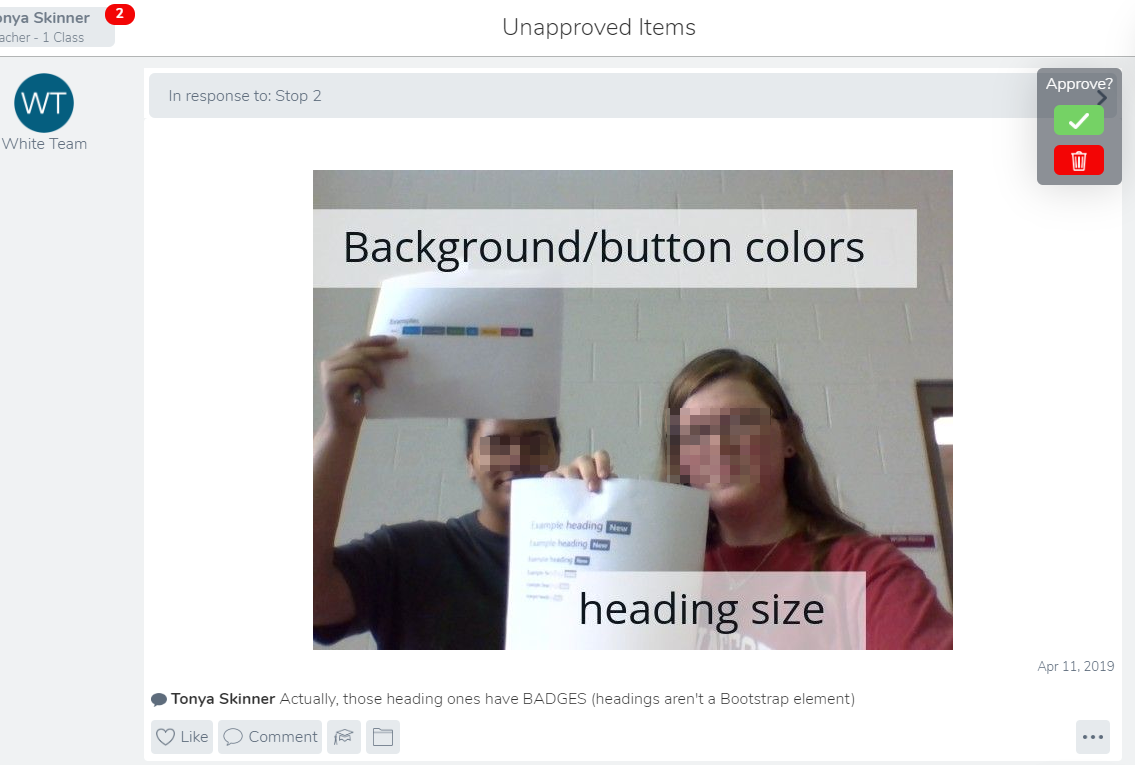
Stop 2:  Find the Bootstrap wall. Take a picture with two group members holding two of the examples. Then, add text to identify what bootstrap feature or component they illustrate before posting.  (I printout out screenshots of bootstrap components and tacked them up on the railing in the hallway near my room)


Stop 3:  In your own words, your group members should use the following terms in a SPOKEN paragraph (either video or audio). Be sure your use of the term clearly shows you know what it means! I am not looking for dictionary definitions, but rather "real people" explanations.

Not worth credit--(isn't descriptive)
"John really liked the webpage that had the jumbotron and favicon because they made the page look cool."

Select at least 5 terms from this list----
Jumbotron, hexadecimal, favicon, thumbnail, CSS, class, HSLA, Javascript, hyperlink

Stop 4:  Listen to your instructor's message to know what to do! (I had an audio message in the app telling them to find something in the lobby by the office, take a picture, and translate the color to a hex code using the app).

Reflection

The students enjoyed the activity. I asked them for feedback about the length of the activity and the setup. They all agreed four activities was good for a high school class and 45 minutes.

The example session I attended didn't really give you all of the "stops" at once and I did with this group because I thought it would keep them all going in different directions and they wouldn't have to wait on me to review their activity before they could move on to the next one. However, the big issue with that was that they didn't know immediately if they were wrong. There isn't a way to "reject" an upload that they submit (just to delete it). I can approve it with a comment saying there's an issue but then they might assume it was okay. So, in the future, I think I will just tell them they have to review their items and my feedback and I will leave a comment on EVERY submission saying approved or denied (with notes for correction).  That might be a little confusing on the end because some may have more submissions than others.... but at least they would have feedback. As it was, when they finished all four, they found me and then I just told them that Stop 2 was denied. It worked okay, but I just need to think through that hurdle.  I think I will have a "final activity" that doesn't have instructions in Seesaw so students can complete the first 3 or 4 in any order and then can only get the final envelope from me IF they have all the others completed correctly. (But, let me tell you, if your tasks are complicated and take awhile to approve, you will drive yourself crazy!).


Another note a student gave was the the video upload took some time and so they had to wait on that to move on. Had I put the "stops" on paper in envelopes rather than in the app, they could have perhaps moved on to the next one. I didn't specific a length on the video, so those took awhile for me to approve (one was 6 minutes long!). So, lesson learned on that.

Overall, I enjoyed this and they did, too. It didn't take a ton of planning. I just need to learn Seesaw better. Our network had moments where I couldn't see their work and such (oh, technology!) but other than that, it was pretty cool!

I'd like to try this with a big class next. My Photoshop class does some photography and I think this would be a fun project to do with that unit while we go roam around taking pics. I also think I can have a "group worksheet" or word play type activity (maybe a scramble with a secret word) that they take a picture of when complete that goes over terminology or something that will keep them thinking as well. But, this is a very interesting way to review content and get kids up and moving!


Wednesday, September 19, 2018

They Hate Reading... But it's Okay! #busedu

Ever want your classes to read? You assign an article, they sit there and read it, maybe you have them write a short reflection... and you move on. They might have read it. Some read it quickly and others probably never finished. Some understand and others just move on. 

I've even heard teachers say they don't assign textbook reading anymore because they don't read it anyway.

Sound familiar?

I recently read about Reciprocal Teaching (or Reciprocal Reading) in the classroom. I am teaching a Business Communication class and need them to read nonfiction articles in this course and learn how to apply them, but I know that students do little reading these days. And, I also know that they tend to skim over unfamiliar words and zone out when reading (even when reading in groups).

But, I love this idea. And, I borrowed the worksheet from Literacy in Focus. It worked great for my class, too.

Let me be clear:  This didn't require a whole lot of prep (but more than it will in the future because I wanted to communicate expectations) and the students were reading a TWO PAGE ARTICLE. That's it. But, they were really digging into the article. As I told them, to do this correctly, it will take about 30 minutes. And I meant it.

I picked groups today (with the promise they could in the future if they behaved) and they got to move around in the classroom (circles, sit on floor, whatever) so that the group could work together. Each group member got a worksheet to complete (look at my Google Doc for the instructions as I gave it). 

Here's the Google document with the steps for this activity (you'll need the Literacy in Focus worksheet, too) and links to the four articles they analyzed today along with the "vocabulary" words I picked (I printed one article for each group with those words underlined). 

It actually went well. They all participated. Everyone had to lead at some point. Everyone had to speak to their group members at some point. This is a group I struggle with, too. But, I was upfront that at their age, I know they don't read much, I know they skip over unfamiliar words, and that I wanted them to change that. When you aren't taught how to "really read" for comprehension, it's hard. This gave them a process that make it easier to do (and they paid attention and did what they were supposed to for the entire class period).

I plan to do these every few weeks. Take a look and let me know if you've done something like this before in your classroom. 


Thursday, September 6, 2018

The Chromebook Curse... #busedu

So, my school district went "one to one" on Chromebooks a couple of years ago. As a teacher in a very nice computer lab, we don't use them in my room, but I think it's a good idea to have in the general classroom. I teach Adobe applications, which don't run on Chromebooks, and a dual credit MS Office class, which must be articulated through the university and must use the full version to meet articulation requirements (so no Google Docs).

But, I am Google Certified and feel like Google Docs is great for students to know.

HOWEVER...

Our Computer Applications team (which feeds into my dual credit class) has had the worst time this year with students not knowing computer basics. Sadly, I have to blame this Chromebook situation. As students must have Computer Applications to take the higher level technology classes, I haven't run into the situation YET (I have Computer Applications next semester, though, so I am prepping myself).

Students are not adept at saving documents, understanding file extensions, basic file management, or even understanding where "Downloads" disappear to when they download something from the internet.

When we meet with our vertical collaboration team, we intend to try to find a method of attack for this issue, but it's been a rocky start to our Computer Applications classes, which use an online textbook/Mindtap and SAM. As students must download starter files, move them to a location other than the Downloads folder, save/rename to upload properly, etc., they are just lost getting through the first unit. And, they aren't struggling with PowerPoint; they are struggling with basic Windows things.

Anyone else noticing this? I guess this is the first year where students in junior high did not learn "the old way" and it's quite apparent. What I assumed were just known concepts are foreign to these students, which would be terrible if they entered business/industry with only knowledge of Google Docs (um... or college!).

Curious to see if any of you are experiencing a similar plight in your classrooms. Head back to my Facebook and let me know!

https://www.facebook.com/tonyabized